
One of the simplest ways to protect the accuracy of your financial records is by using the Lock Fiscal Period feature in ABSS Accounting and ABSS Premier.
Many businesses complete their monthly bookkeeping, submit reports to management, and even file tax returns, only to discover later that someone accidentally edited or deleted a transaction from a previous month. A single change can throw out your financial reports, GST/SST records (where applicable), or even your year-end accounts.
Fortunately, ABSS includes a built-in feature to prevent this.
What Is the Lock Fiscal Period Feature?
The Lock Fiscal Period feature prevents users from making changes to transactions dated on or before a specified date.
Once a fiscal period is locked, users cannot:
- Edit existing transactions
- Delete transactions
- Enter new transactions dated within the locked period
Think of it as putting a padlock on your completed accounting records. Once you’ve finished reconciling and reviewing a month, you can lock it to ensure the figures remain unchanged.
Why Should You Lock Fiscal Periods?
1. Protect Your Financial Reports
Management relies on accurate Profit & Loss Statements and Balance Sheets when making business decisions.
If someone accidentally changes an old invoice or payment, your reports may no longer match the figures previously presented to management.
2. Prevent Accidental Changes
Not every mistake is intentional.
A user may accidentally:
- Delete a payment
- Edit an invoice amount
- Change a transaction date
- Record an entry in the wrong accounting period
Locking completed periods helps prevent these common errors.
3. Maintain Audit Integrity
During an audit, accountants expect historical financial records to remain consistent.
If transactions continue changing after reports have been issued, it becomes difficult to reconcile figures and explain differences.
Locking completed periods helps maintain a clear audit trail.
4. Keep Bank Reconciliations Accurate
Imagine you’ve successfully reconciled your bank account for March.
If someone later edits or deletes a March payment, your reconciliation will no longer agree with the bank statement.
Locking the period helps preserve completed reconciliations.
When Should You Lock a Period?
A good practice is to lock each month after you have completed:
- Recording all transactions
- Bank reconciliation
- Reviewing financial reports
- Making month-end adjustments
Many businesses lock each month shortly after month-end, while others lock the financial year once the annual accounts have been finalised.
How to Access the Lock Fiscal Period Feature
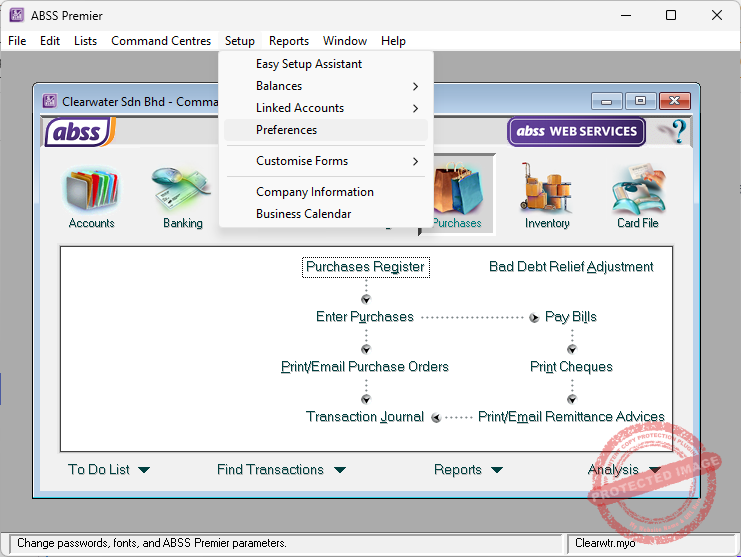
In ABSS Accounting or ABSS Premier, click on Setup from the menu at the top, then Preferences.
In the Preferences window, select the Security tab.
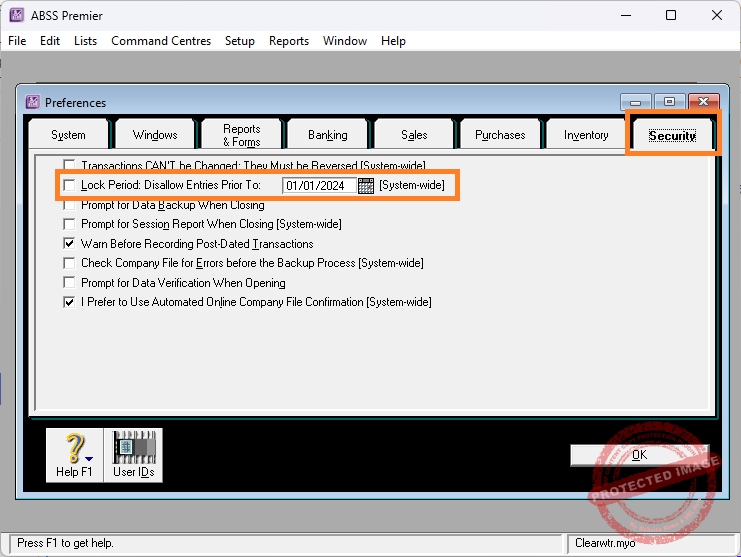
Within the Security tab, you’ll find the Lock Period option.
Simply enter the date up to which you wish to lock your accounting records.
For example:
- Lock Date: 31 March 2026
This means transactions dated 31 March 2026 and earlier cannot be modified.
Who Can Unlock It?
Only users with the appropriate access rights can change or remove the lock.
This provides an additional level of protection by ensuring only authorised personnel, typically the business owner or accountant, can unlock prior periods if legitimate corrections are required.
Best Practices
To get the most from this feature:
- Lock each accounting month after it has been reviewed.
- Restrict access to users who genuinely need to unlock periods.
- Make backups before unlocking a period for adjustments.
- Re-lock the period immediately after corrections have been completed.
- Review user access rights regularly.
Final Thoughts
The Lock Fiscal Period feature is one of the easiest ways to safeguard the integrity of your accounting records.
It only takes a few seconds to enable, yet it can prevent hours of investigation caused by accidental edits to historical transactions.
If your business uses ABSS Accounting or ABSS Premier, make locking completed accounting periods part of your regular month-end checklist. It’s a simple habit that helps keep your financial reports accurate, your reconciliations intact, and your records audit-ready.